MY ROLE
Founding Product Designer / Product Strategy / Product Design / Design Systems
Team

Evan
/ Product designer

Emmanuel Obeto
/ Frontend developer

Soji
/ CEO
TIMELINE
2024 - 2025
Links
Designing an AI operating layer for HR, IT, and employee operations
Barrel AI was designed to help companies turn everyday HR and IT work into clear, trackable actions.
Instead of work living across emails, spreadsheets, HRIS tools, device systems, app permissions, documents, and chat, Barrel brought everything into one workspace — with an AI agent that could understand plain English, propose a plan, ask for approval, execute tasks, and leave a receipt.
My goal was simple: make complex company operations feel visible, safe, and easy to run.
The problem
At 9 a.m., one new hire can trigger a swarm of tabs: HRIS, identity, e-signature, device management, email, chat, app access, documents, and approvals.
People copy the same details into different systems and hope nothing breaks. When something does, it is hard to see what changed, who approved it, or how to undo it.
The problem was not just speed. It was trust. Teams needed one source of truth and a safer way to ask for work, preview the plan, approve changes, and track the outcome.

One workspace for people data, approvals, documents, access, and AI actions.

A living employee record that HR and IT can manage from the same place.
Turning requests into operational plans
The AI task manager became the place where users could ask Barrel to perform company work.
A request could become a plan with steps, owners, timing, and status. The user could review it, pause it, reopen it, or approve it before anything important happened.
The goal was not to make AI feel magical. It was to make work feel visible, safe, and easy to control.

The agent proposes a step-by-step plan before work runs.
Making onboarding feel calm
New hires do not need to see the operational complexity behind onboarding. They need to know what to do now.
For self-service onboarding, I designed a focused experience with one clear next step, helpful guidance, and enough context to build confidence.

One screen. One task. No noise.

The new hire can review and sign without needing HR to explain the process.
Building the employee record
The employee record became the source of truth for each person in the company.
Instead of app access, documents, devices, and work details living across different tools, each employee had a profile with actionable tabs.
This gave HR and IT the same view of the same person, making handoffs cleaner and audits easier.

Apps, access levels, and install dates live inside the employee profile.

Documents stay attached to the person they belong to.
Reducing document work with smart fields
Offer letters and employee documents often repeat the same information: name, title, company, compensation, and employment type.
I designed a document editor where teams could insert smart fields from the People record and preview every variable before sending.
This reduced copy-paste work and made documents faster to generate safely.

Templates pull live fields from employee records.

Admins can check every variable before sending.
Letting teams shape their own data
Different companies track different things.
The Data Manager gave admins a safe way to create custom fields, define where the data comes from, set visibility, and preview how the field would appear before publishing.
The design made customization feel controlled, not risky.

Custom fields can be created without engineering support.
Giving managers visibility into time off
Time off was designed as a simple workflow with shared context.
Employees could request time away, while managers could see team impact before approving.
The goal was to reduce back-and-forth and make decisions easier.

Balances, policies, requests, and team calendar live in one view.
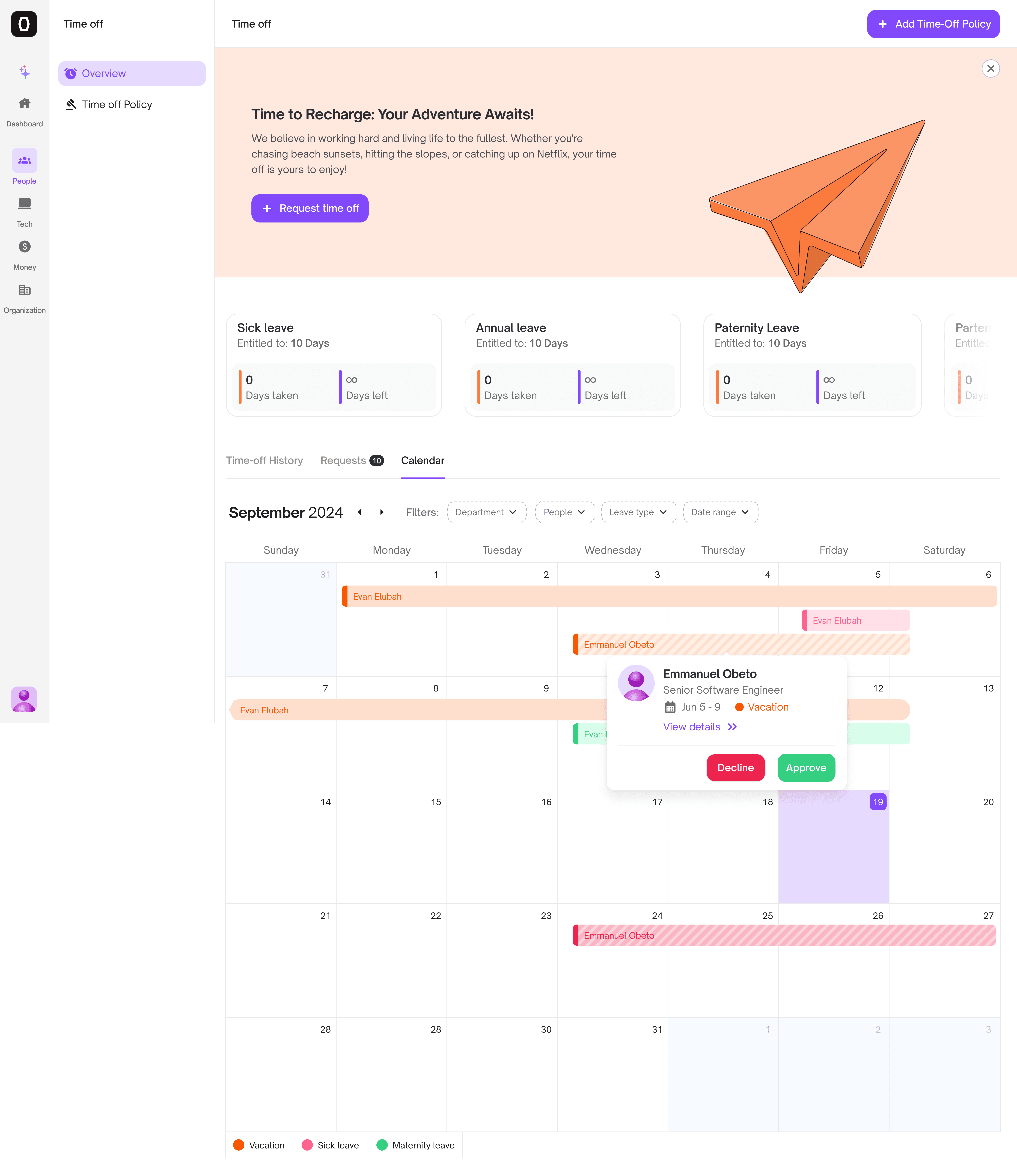
Managers can approve with context, not guesswork.
Designing the agent control layer
Agent Studio was the control layer behind the AI experience.
Admins could define what an agent should do, what tools it could use, what instructions it should follow, and which company fields it could reference.
This made the AI more predictable, explainable, and safe to use across teams.

Admins can write instructions and insert live company fields.

Teams control what actions the agent is allowed to perform.
Designing the system
Barrel had many product surfaces: chat, workflows, employee records, documents, permissions, tables, forms, modals, settings, and dashboards.
I designed the system around reusable patterns so the product could scale without becoming visually inconsistent.

Tokens, type, spacing, components, states, tables, and product patterns.
Reflection
Designing Barrel AI taught me that the best AI products are not just chat interfaces.
The real value comes when AI can help people get work done — safely, visibly, and with control.
For Barrel, that meant turning plain English into structured action while keeping every step clear enough for teams to trust.